

The database thatconnects your work
Google Workspace™–native,
AI-powered project management

Google Workspace™–native,
AI-powered project management: that's ZARMS
Keep a task's owner, due date, effort, progress, conversations, and deliverables together on a single card.
Everyone signs in with their everyday Google account, so your whole team can start today.
Files stay in one place
ZARMS creates a Google Drive folder for every card and prompts you to upload deliverables or add shortcuts.
Get ahead of delays
AI creates cards in bulk from meeting notes and other documents, spots delays and stalls, and suggests the next step.
Everyone can join, at any headcount
The Standard plan is a flat rate per organization with unlimited members. You can invite outside partners, too.
Smooth handovers
Who changed what, when, and why is recorded automatically, so you can trace the history later.
* Anyone with a Google account (including free Gmail) can use ZARMS. A Google Workspace subscription is not required.
ProblemsDoes this sound like your team?

By the time you notice, the deadline has passed
Nobody gets around to updating the task sheet, so delays only surface after the deadline. You can't tell how far along things really are without asking, and weekly meetings turn into status checks.

Work you asked for slips through the cracks
Requests live in chat, decisions in meeting notes, and files somewhere in Drive. “Who does what, by when” isn't written down anywhere.

Work piles up on your most capable people
You can't see who is carrying what, or where their time goes. Work drifts to whoever is easiest to ask, and only they know how busy they are.

New tools never stick
More IDs and passwords, files split between the tool and Drive, and costs that grow with every seat. In the end only a few people use it, and the team goes back to the old way.
ZARMS solves all of these at once.
FeaturesWhat you can do with ZARMS
- Basic
- Starter
- Standard
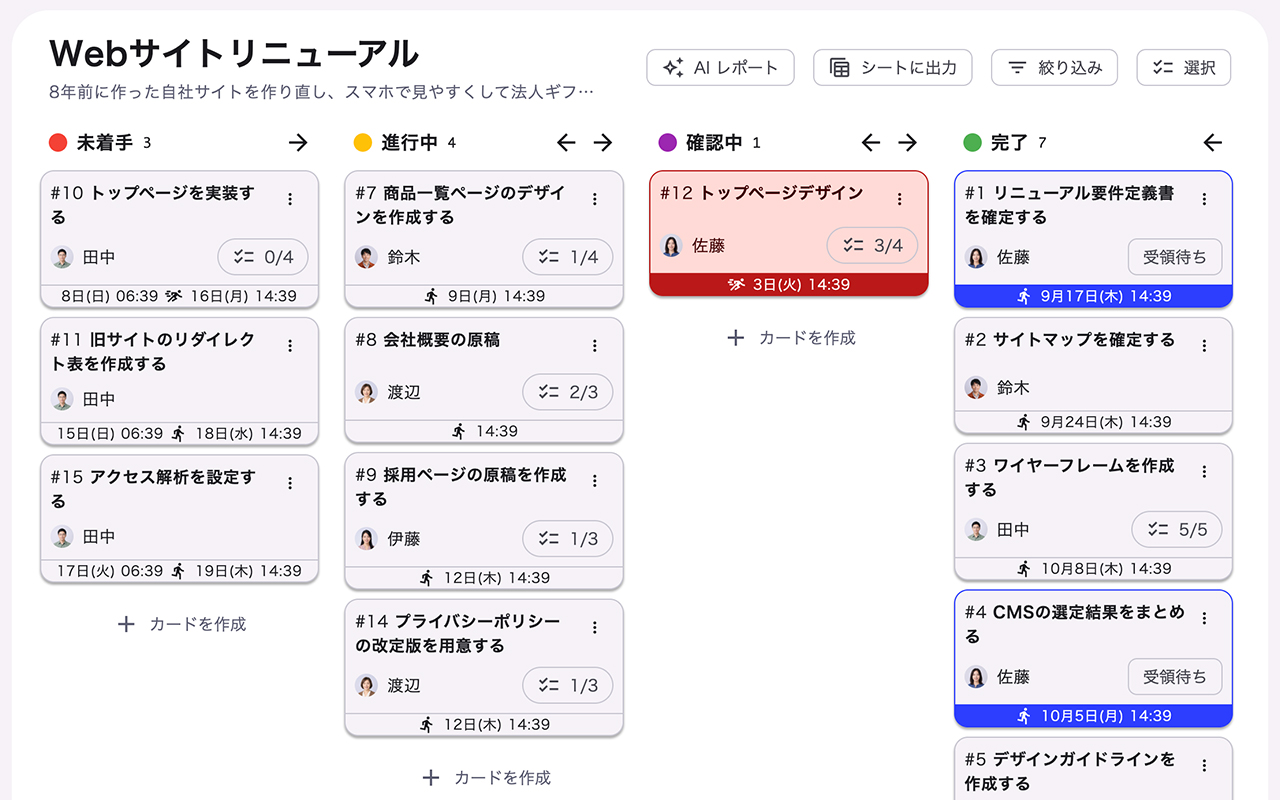
Organize intuitively with boards and cards
Use boards for departments and projects, and cards for tasks and deliverables.
Boards open in a familiar kanban view, and you can switch to list or timeline views.
- Starter
- Standard
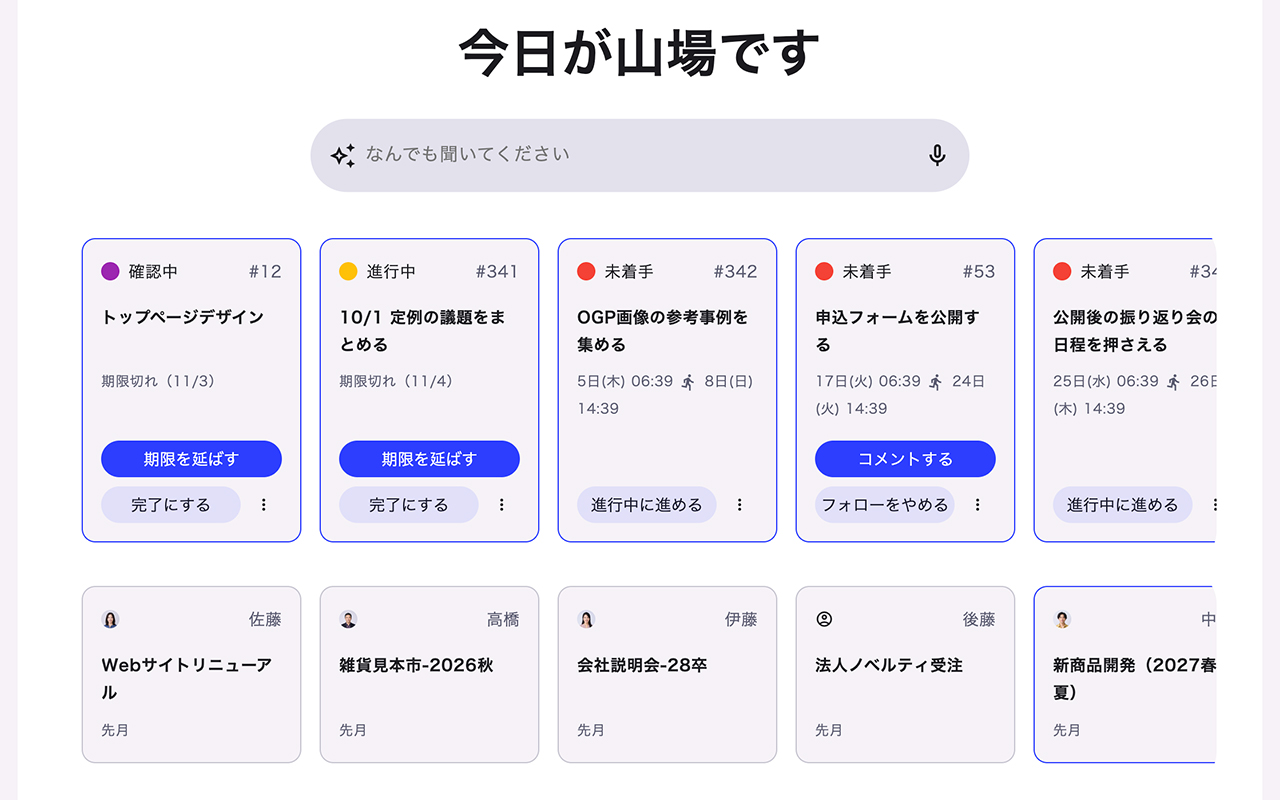
Get stalled cards moving
AI finds cards that are past due, haven't moved in a while, or lack a clear description, and suggests next actions or a nudge to the assignee.
No more “we noticed too late” or “I didn't know what I didn't know, so it sat there.”
- Starter
- Standard
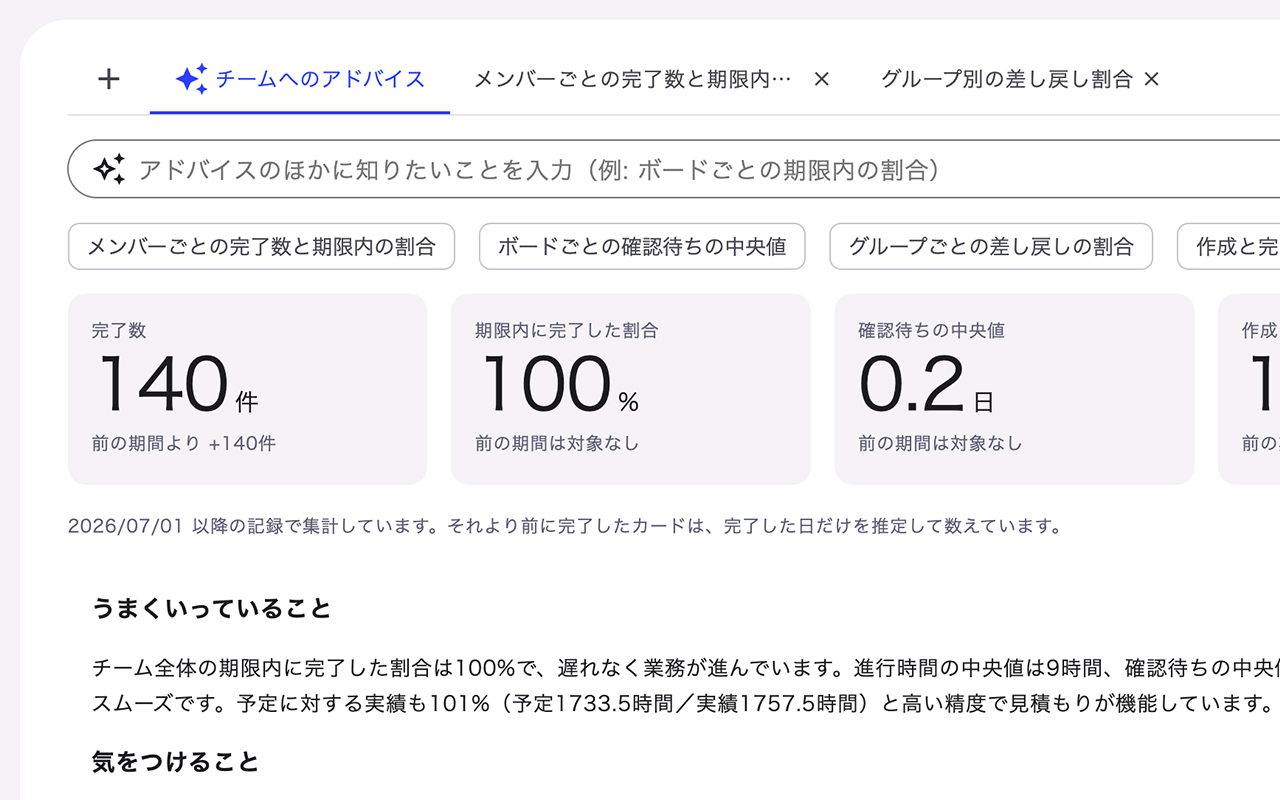
See your area's progress at a glance
AI analyzes the progress, workload, and delays across the boards and groups you are responsible for.
Beyond the numbers, it suggests the next move tailored to you.
- Starter
- Standard
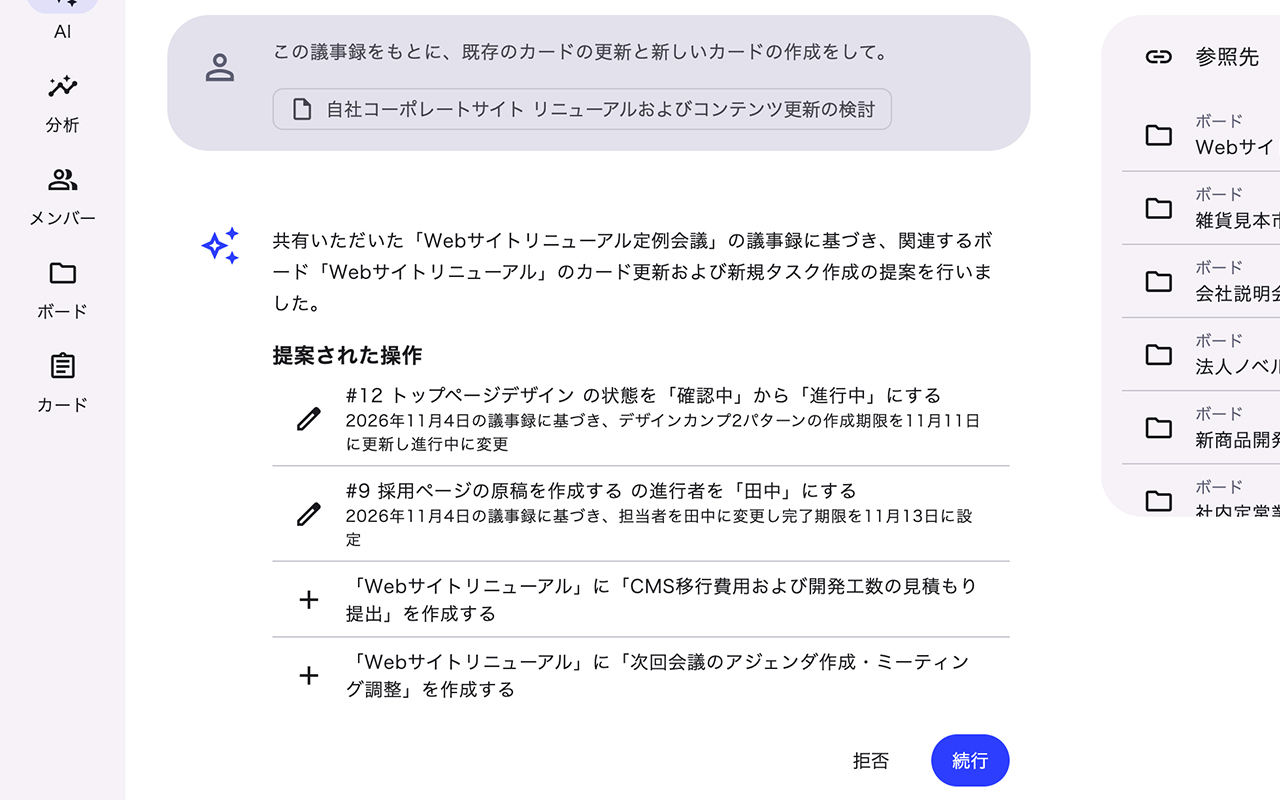
Turn documents into cards in one go
Hand over a project plan or meeting notes, and AI reads them and proposes the right boards and cards.
No manual entry, so work can start the day it's decided.
- Basic
- Starter
- Standard
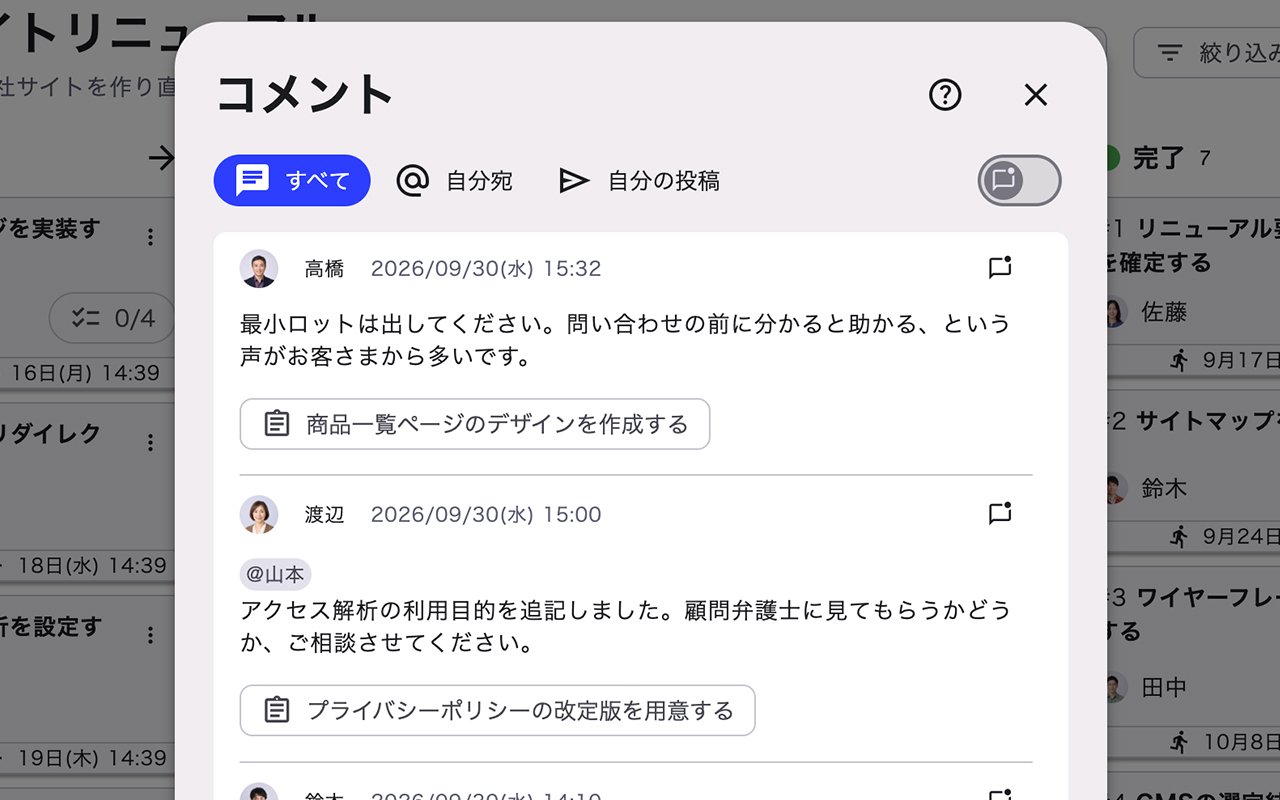
Post change comments automatically
When you change a field on a card, a comment describing the change is drafted for you to review before saving and sending.
Changes are confirmed on save, which prevents accidental edits and keeps the reason on record.
- Starter
- Standard
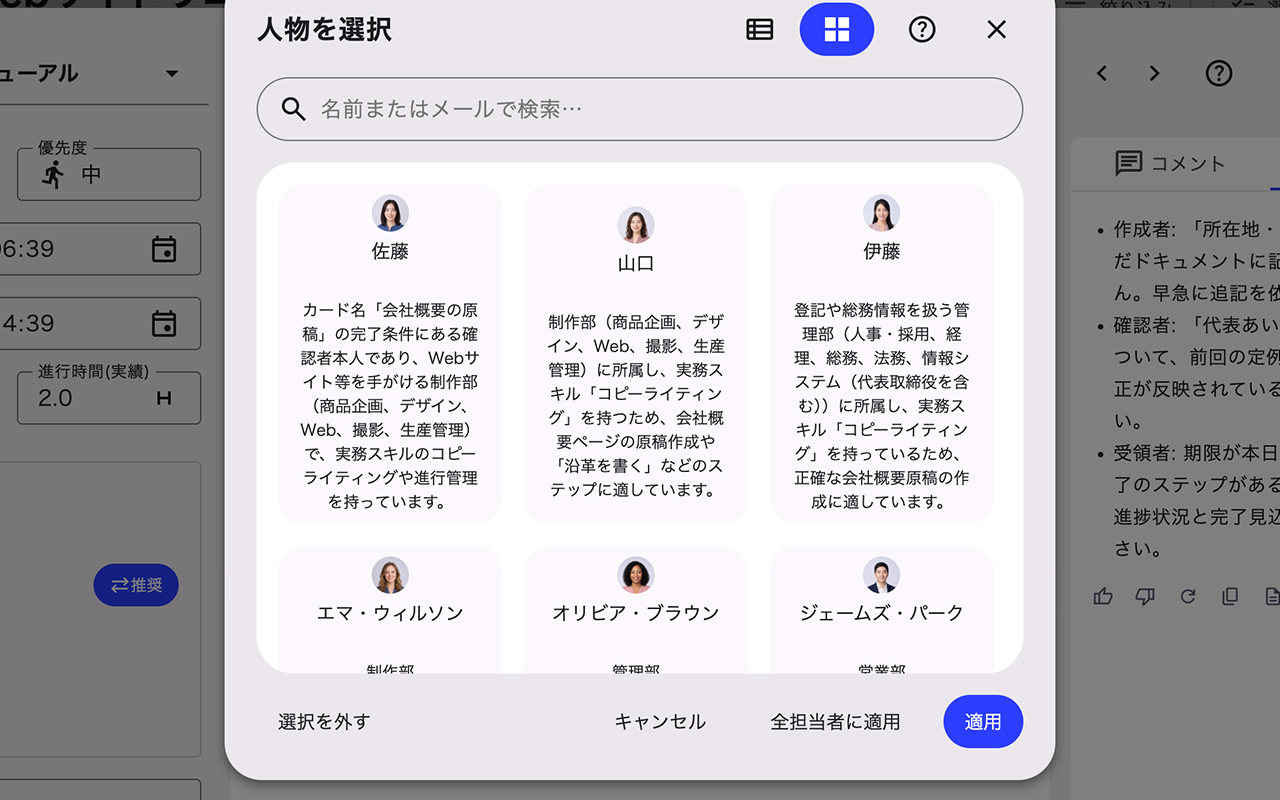
Put members' skills and teams to work
For cards without an assignee, AI recommends candidates based on each member's workload, skills, and team.
Less time spent with work in limbo because nobody knows who should take it.
- Basic
- Starter
- Standard
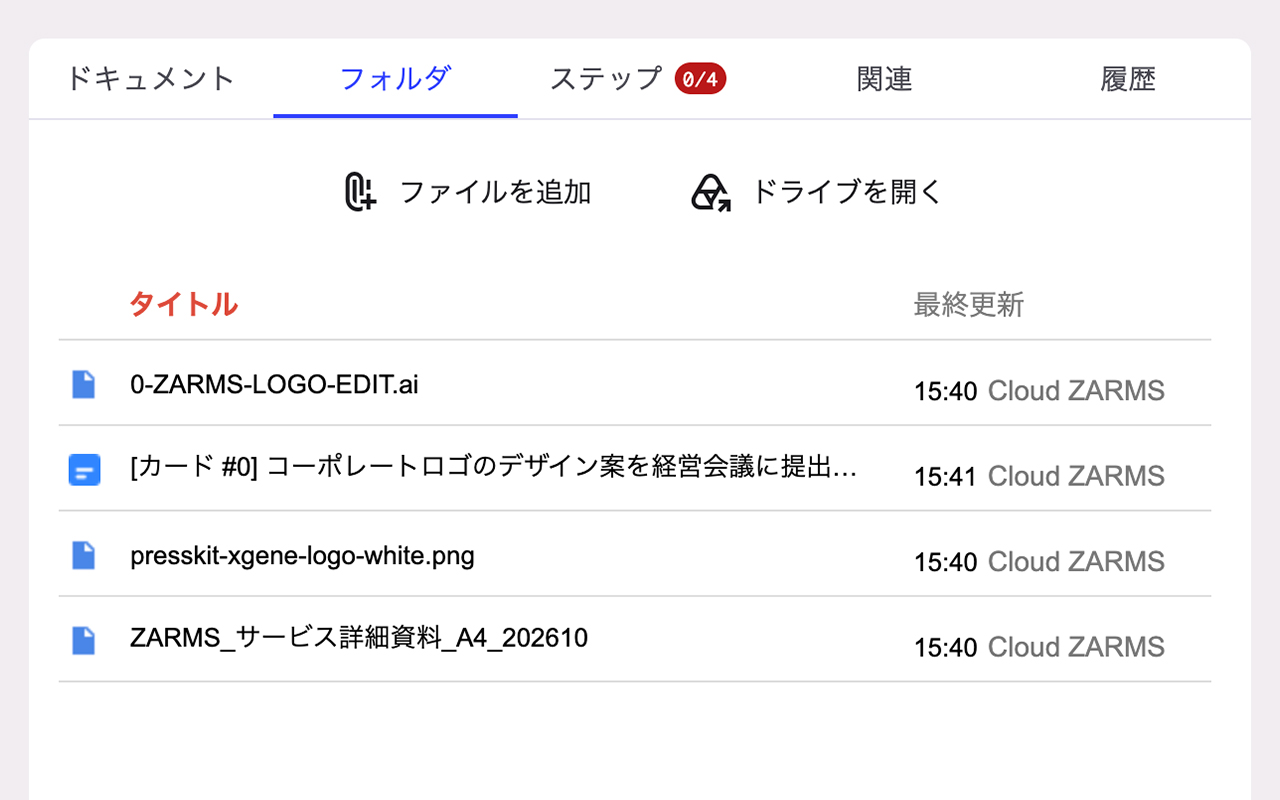
Related files gather on their own
A Google Drive folder is created automatically for each card.
Docs, Sheets, and Slides, along with photos, videos, and design files that tend to get buried on personal computers, can all be linked to the card.
- Starter
- Standard
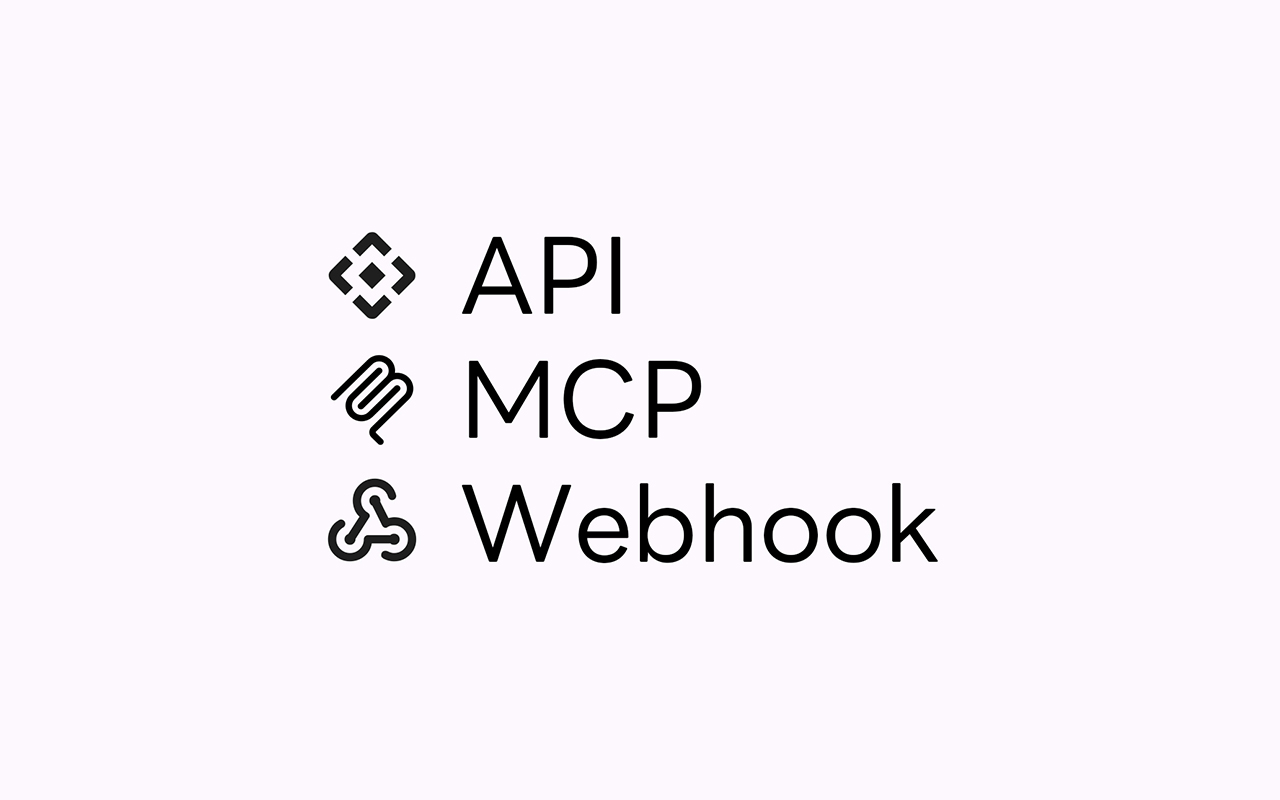
Connect your own AI agents
If your admin allows it, you can connect ZARMS to the AI tools you already use, such as Gemini, ChatGPT, and Claude.
Retrieve and update information within your own permissions without opening ZARMS. Processing done in the connected tool does not use ZARMS credits (calling ZARMS AI features from the connected tool does).
- Basic
- Starter
- Standard
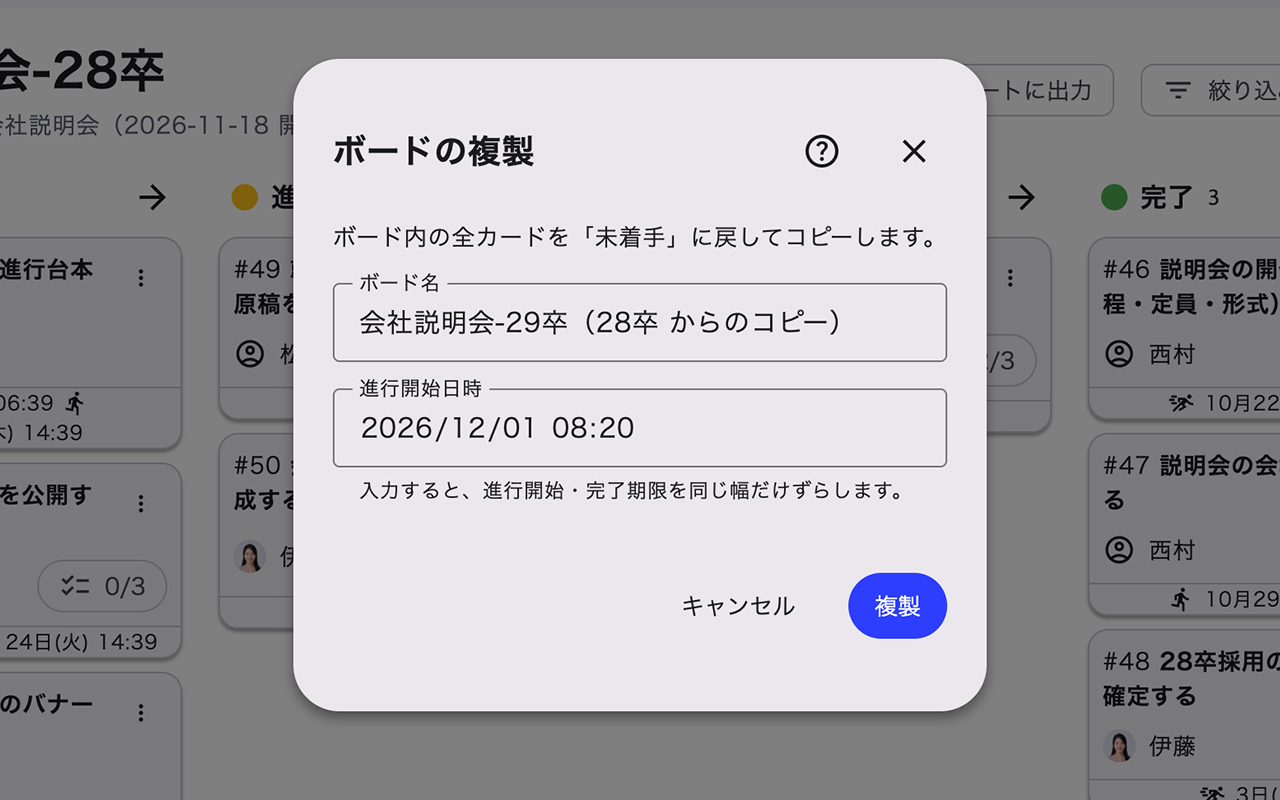
Reuse an entire board
For recurring projects or annual events, just duplicate the whole board and set a new start date.
Start and due dates on every card shift automatically.
- AI features use “AI credits” (credits) shared within your team.
- AI, API, and MCP features are not available on the Basic plan (except during the Standard plan free trial).
- Tools you connect to ZARMS are billed separately by their providers.
ZARMS can do much more!
See all features in HelpWhat you enter is never used to train AI. Admins can turn off or restrict AI features.
* AI providers may log submitted content for a limited time to detect and prevent abuse.Details →
Try the Standard plan
free for 30 days.
PricingSimple pricing per organization
A flat rate per organization, with no extra charge per user.
Basic
¥0
- No payment details required!
- Unlimited cards
- Up to 10 boards
- Up to 30 members
- 13 months of audit logs
- Search by card number / card name
- Automatic change comments
- Standard support (handled in order)
- Recommended
Starter
¥9,800/month
¥98,000/year (2 months free)
- No per-seat charges!
- AI bulk search / create / edit / analyze
- Up to 30 boards
- Up to 100 members
- 13 months of audit logs
- Integrate with existing systems via API
- Connect your preferred agents via MCP
- Priority support (first reply within 3 business days)
Standard
¥19,800/month
¥198,000/year (2 months free)
- Unlimited cards, boards, and members!
- AI bulk search / create / edit / analyzeThe plan's AI credits are double the Starter plan
- Unlimited boards
- Unlimited members
- 13 months of audit logs
- Integrate with existing systems via API
- Connect your preferred agents via MCP
- Priority support (first reply within 3 business days)
If you are new to ZARMS, a free trial of the Standard plan starts automatically.
You will never be charged unless you add a payment method.
If the trial ends without one, your team switches to Basic automatically.
- Prices are in Japanese yen and exclude tax. We may change what each plan includes at our discretion. Billing changes take effect from the next billing period. Final prices are shown when you start using the service.
- If you are new to ZARMS, a free trial of the Standard plan starts regardless of the plan you choose, and you can use AI, MCP, and API features at the Standard level during the trial.
- The free trial does not apply to a second or later team created with the same account. If you choose Starter or Standard for a new team, payment is required when you start.
- We accept credit cards and invoice payment (bank transfer).
- Starter includes 1,000 credits and Standard includes 2,000 credits each month. Additional credits are available from 1,000 credits = ¥1,000 (excl. tax). Monthly credits do not roll over; purchased credits are valid for 90 days.
CompareHow ZARMS compares
| ZARMS | Spreadsheets + Apps Script | Typical task / project management tools | |
|---|---|---|---|
| Sign-in | Just your Google account (no extra IDs to manage) | Google account | A separate account per tool (some support Google sign-in) |
| File storage | Google Drive (ZARMS doesn't store your files) | Google Drive | Usually the tool's own storage |
| Pricing | Flat rate per organization, unlimited members (Standard plan) | Only your Google Workspace fees | Often priced per user |
| Change history | Recorded automatically for every field | File version history only (field-level records must be built) | Depends on the product and plan |
| Data structure | Common fields across all boards | Formats tend to differ from sheet to sheet | Depends on how you run it |
* As of October 2026, based on our own research. Features and pricing of each product vary by plan.
SecuritySecurity & data portability
View the security checklistJust “Sign in with Google”
Your 2-step verification, passkeys, and account suspensions apply to ZARMS sign-in as they are.
Reliable history and audit logs
Who changed which field, when, and how is recorded automatically. Every plan keeps 13 months of audit logs, which you can export to Google Drive as CSV during that period. Posted comments, including archived ones, are never deleted.
We don't hold your files
Files are stored not in ZARMS but in the Google Drive folder chosen when the team was created. If sharing settings change on the Google Drive side, ZARMS never overrides them. ZARMS only accesses files inside that folder.
Export your data anytime
While you use the service, admins and permitted members can export the data they have access to as a spreadsheet in Google Drive.
SetupUp and running in minutes
Visit HelpSign in
Sign in right away with your Google account. No new ID or password needed.
Choose a plan
Start with a 30-day free trial of the Standard plan. No payment details needed during the trial.
Name your team
Enter the name of your company, school, or organization. The team creator (the admin) can change it later.
Connect Google Drive
Choose where files shared within the team will live. Have a shared drive or shared folder ready.
You can also import your data from a spreadsheet.
Use casesExample use cases

A creative agency producing websites and videos
A production company that delivers more than 100 websites and promotional videos a year for companies and local governments. Directors, designers, and engineers team up with outside partners on each project.
- Challenge
- Every time they brought in a partner, per-user fees went up, and price increases at renewal added to the cost. They couldn't see effort per project, and the gap between estimates and actuals was eating into profits.
- With ZARMS
- With the ZARMS Standard plan, they invite outside partners to the same boards without worrying about headcount. Comparing estimated and actual effort per project shows which stages drift the most, making the next estimate more accurate.

A manufacturer of precision industrial parts
A long-established maker of precision parts for automobiles and industrial machinery. The development and sales teams at headquarters work with two factories to take products from prototype to mass production.
- Challenge
- Prototype projects were tracked in spreadsheets and Apps Script on a personal account, and when the author was transferred, nobody could maintain them. Each department used a different format, so company-wide workload was hard to grasp.
- With ZARMS
- With ZARMS, they standardized the stages from prototype to mass production as a board and duplicate it for each project. Permissions are tied to roles rather than people, so transfers don't break the process. Who changed what, and when, is recorded automatically, which makes handovers smooth.

A consulting firm supporting small and mid-sized businesses
A consulting firm that helps small and mid-sized companies with business planning, operational improvement, and subsidy applications. Each consultant handles several clients at once.
- Challenge
- Every meeting created new to-dos, but writing tasks out of the minutes couldn't keep up. It was hard to see the workload per client, and assignments were made on experience and gut feeling.
- With ZARMS
- With ZARMS, AI creates the cards each client board needs just from the meeting notes. AI analyzes workload and delays per client and suggests next steps, and recommends the right consultant based on current assignments and strengths.

A company that plans and runs local events
A company that plans and runs more than 20 events a year, such as local music festivals and shopping-street markets. Each event involves the local government, sponsors, and many volunteer staff.
- Challenge
- Venue photos and flyer designs were scattered across personal computers and chats, so preparation started almost from scratch every year. Messages to the local government and sponsors were written one by one.
- With ZARMS
- With ZARMS, every card gets its own Google Drive folder, so photos and design files gather naturally. The next year, they just copy the board and shift the event date to start preparing right away.
- All scenarios are fictional.
FAQFrequently asked questions
What is Google Workspace?PR
Google Workspace is a cloud-based productivity suite that helps teams communicate and collaborate, so work can get done from anywhere, on any device. It's easy to set up, use, and manage, so you can focus on the work that matters.
Custom business email
Send and receive email with a professional address on your company's domain (for example, yourname@yourcompany.com). Gmail is easy to use, so you can work efficiently while building your brand.
Access from anywhere, on any device
Check email, share files, edit documents, and hold video meetings at the office, at home, or on the go. Pick up where you left off on a computer, tablet, or smartphone.
Admin tools built for business
Robust admin settings let you manage users, devices, security, and more yourself.
Sign up through our referral link for a 14-day free trial and 10% off your first year of Google Workspace. For details, please contact us.
Can individuals use ZARMS, not just organizations?
Yes.
ZARMS is a service for businesses. Individuals such as sole proprietors and freelancers can sign up when they use it for business (a Google account is required). Personal, non-business use is not intended.
Can I change plans or cancel?
Yes.
- Downgrading during the trial: takes effect immediately
- Upgrading: takes effect immediately (prorated)
- Standard → Starter: takes effect immediately (the prorated amount is reflected in your next bill)
- Paid plan → Basic (cancellation): takes effect at the end of the billing period
- No minimum contract period
- 12-month prepaid plans cannot be canceled or refunded midway
- Switching to Basic keeps all the data you've created
- You can switch even if you exceed the new plan's limits (Basic: 30 members and 10 boards; Starter: 100 members and 30 boards). A confirmation screen appears before you switch
- While either members or boards exceed the limit, you can't create boards, cards, skills, or groups, or add or invite members. You can still view, comment, edit existing items, and change settings. Once you resolve the overage or upgrade, you can create again
Could heavy AI use run up a big bill?
No.
Admins can set a monthly cap on credit usage for the whole organization, and they are notified by email as usage approaches the cap. When the cap is reached, AI features stop, and the cap is never raised automatically. Even without a cap, usage stops when the included credits run out, and your bill won't grow unless you buy more.
Is there a storage limit for files?
No.
ZARMS doesn't store the files themselves. Attachments use your Google Drive storage.
What payment methods are available?
ZARMS payments are generally made by credit card.
For 12-month prepaid plans, invoice payment is also available. If you'd like to pay by invoice, please contact us.
Can I get individual advice on adoption and operation?
Yes.
We also offer one-on-one consultations on adopting and running ZARMS. Feel free to contact us.
What can I do with 2,000 credits?
If you use only one of the following features, 2,000 credits cover roughly:
- Card summaries: about 660 times
- Card drafts: about 220 times
- Board reports: about 220 times
- AI search: about 95 times
* Estimates based on typical input size; actual usage varies with content.
That's enough for most organizations' monthly use. The free trial also includes 2,000 credits, so you can see your actual usage.
Do you issue quotes, invoices, and accept purchase orders?
Yes.
Request a quote through our contact form. For credit card payments, we email a receipt and invoice every month, and you can also download them from the admin screen. For 12-month prepaid invoice payment, we issue an invoice. We also accept purchase orders.
What happens to my data after I cancel?
Canceling your plan simply switches you to Basic, so your cards and boards are not deleted (while you exceed the limits, you can't create new items or add members, but you can still view and edit existing content).
The files themselves stay in your Google Drive. If you delete the team itself, you can export your data to a spreadsheet beforehand.
Can I invite outside partners and guests?
Yes.
Anyone with a Google account can be invited to the same team. On Basic (up to 30) and Starter (up to 100), outside members, including people who are only on the roster, count toward the member limit. Archived and deleted members don't count. The Standard plan has unlimited members, so you can invite as many as you like. Permissions are granted by role, so you can limit what each person sees.
Can we migrate from our current tools?
Yes.
You can import cards in bulk from a spreadsheet. If you use another task management tool, export it to CSV and import it through a spreadsheet. We can also help you plan the migration.
Which browsers and devices are supported?
We recommend the latest stable version of Google Chrome (with a regular profile).
Besides computers, you can use ZARMS in the browser on tablets and smartphones (no app installation needed).
Anything else you'd like to know? Visit Help.Feel free to contact us with any questions.


CompanyOperated by
Visit our corporate site- Company name
- Xgene Inc.
- Business
- Crafting ZARMS, a Google Workspace™–native, AI-powered project management tool
- Founded
- July 7, 2026
- Representative
- Teppei Kawabe
- Officers
- Teppei Kawabe (Representative Director), Momoka Kotsuji (Director)
- Capital
- JPY 770,000 (as of July 7, 2026)
- Telecommunications business notification no.
- A-08-24231
- Business days
- Weekdays, excluding Japanese national holidays, the year-end and New Year holidays, and the Obon holidays
- Address
- N&E BLD. 6F, 1-12-4 Ginza, Chuo-ku, Tokyo 104-0061, Japan (we do not accept visitors at this address)